
Guide
UGC filming setup under ₹5,000 in India
Brands reject UGC for bad audio and dark footage more than missing 4K. Start with your phone, a stable tripod, basic light, and a clip mic. Total kit can stay under ₹5,000 if you buy selectively.
On this page
Phone-only minimum (₹0-1,500)
- Clean lens
- Back camera, 1080p or 4K
- Do not shoot vertical with digital zoom
- Record in quiet room; soft furnishings reduce echo
- Airplane mode to avoid notification sounds
₹5,000 kit shopping list (typical online prices, verify before buy)
Prices vary by brand and sales. No affiliate required in article.
| Item | Purpose | Typical INR |
|---|---|---|
| Phone tripod with phone clamp | Stable framing | ₹800-1,500 |
| LED ring or panel light | Even face light | ₹1,200-2,500 |
| Clip-on or wired lav mic | Clean voice | ₹1,500-3,000 |
| Plain backdrop or tidy wall | Reduce clutter | ₹0-800 |
Setup in 10 minutes
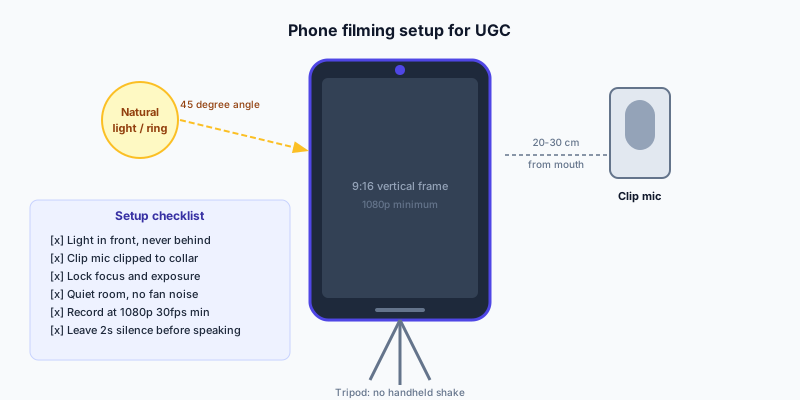
- Mount phone at eye level
- Light at 45° to face
- Mic 15-20 cm from mouth, hide cable
- Test 10-second clip with headphones
- Lock exposure if app allows
Skip these until you earn more
- Cinema cameras
- Multiple RGB lights
- Teleprompter apps (use bullet notes first)
India market context
Brands reject UGC for poor audio and weak hooks more often than for camera model. Indian creators can film at home with window light, a basic lav mic, and a stable phone tripod.
Portfolio proof beats follower count. Show 3 clips in one niche with captions on, product visible early, and clean voiceover so brands trust you with paid ad usage.
How to apply this on UGC Content (creators)
Creators on UGC Content find paid work through live brand briefs. Verification and an eligible creator plan (Pro or Studio) are required to apply. Use this guide when building portfolio samples, writing application notes, and delivering so brands approve faster.
- Complete verification and connect Instagram if the brief requires it
- Upgrade to Creator Pro or Studio when you are ready to apply
- Publish 3+ niche samples that match the brief style
- Apply with a specific hook idea and confirmed availability
- Upload finals on-platform and respond to revision notes within hours
Common mistakes to avoid
Most rejections come from audio, wrong niche fit, or unclear rights quotes. Fix the habits below before you raise your rates.
- Applying without reading the brief or mentioning a hook idea
- Quoting base rate while the brief includes paid ads or whitelisting
- Delivering via external links instead of the platform upload flow
- Ignoring compliance lines for finance, health, or beauty claims
- Missing deadline without proactive message to the brand
Quick recap
Revisit the checklist before you submit your next application. Small improvements to audio, rights clarity, and hook specificity compound across campaigns.
Linked guides at the bottom cover adjacent topics so you do not duplicate research. Start with one change from this page, measure approval speed or ad performance, then iterate.
- Tripod stable
- Face lit evenly
- Audio test passed
- Background tidy
- Notifications off
Key terms
Shared vocabulary prevents disputes. Use these definitions when you write briefs, quotes, or application messages.
| Term | Meaning |
|---|---|
| Usage rights | Where and how long the brand may use your video (organic, ads, web, email) |
| Application note | Short message with hook idea and why you fit the brief |
| Verification | Identity and video review on UGC Content; required for trust, not a earnings guarantee |
| Pro plan | Creator subscription tier required to apply to live brand campaigns |
| Portfolio | Public samples in one niche; brands hire on clips, not follower count |
Sample timeline (first paid deal)
If you are new to UGC Content, this sequence helps you go from profile to first approved delivery without skipping verification or plan requirements.
- Week 1: Verify profile, connect Instagram, publish 3 niche portfolio clips
- Week 2: Activate Creator Pro or Studio; study live briefs in your niche
- Week 3: Apply to 5-10 briefs with custom hook lines
- Week 4: Deliver first yes with clean audio and on-time upload
- Week 5+: Request feedback, update rates for rights, apply to repeat brands
Examples in practice
When teams ask about "UGC filming setup under ₹5,000 in India", the underlying task is usually operational: write clearer expectations, price rights correctly, or ship creatives faster. Below are patterns that work on UGC Content without overpromising results.
Adapt the examples to your SKU, language, and compliance rules. One clear video with honest claims beats three vague clips that confuse viewers or ad reviewers.
- Beauty: texture hook in 2s, application demo, subjective first impression, no medical claims
- Apps: face cam plus screen record, blurred PII, feature-only language for finance products
- Kitchen: problem on counter, hands-only demo, audible product cues, honest before/after framing
- Fashion: mirror or transition reveal, fabric close-up, size noted in caption or voiceover
- Retargeting: answer one objection, slower pace than cold ads, same offer as landing page
FAQ
What equipment do I need for UGC filming in India?
A smartphone, clip-on lavalier mic (Rs. 500-2,000), basic tripod, and window or ring light. Total kit can stay under Rs. 5,000. Audio quality matters more than 4K video for brand approvals.
iPhone vs Android?
Either works if audio and light are good.
Need 4K?
1080p is enough for most social ads.
Window light only?
Fine for daytime; add lamp for consistency.
How long should UGC guides take to implement?
Most teams can apply one guide in a single working session: 30-60 minutes to update a brief template or portfolio, then one campaign or application cycle to test. Measure results over 2-4 weeks of creative testing, not one day.
Does UGC Content guarantee campaign results?
No platform guarantees ROAS or earnings. UGC Content provides brief-based hiring, wallet pay-on-approval, and creator tools. Performance depends on your offer, creative quality, and media buying.
What do creators need before applying to briefs?
Complete verification, active Creator Pro or Studio plan, Instagram connected when required, and 3+ niche portfolio clips. Application notes with a hook idea outperform generic copy.
Is expensive gear required for approval?
Usually no. Clean audio, stable framing, and a clear hook matter more than 4K or cinema cameras for standard social UGC.