
Guide
UGC Creator Verification on UGC Content: Step-by-Step
Verification proves you are a real creator. Complete identity details, connect Instagram, and submit a short verification video. Approval typically takes a few business days. Once verified, upgrade to Creator Pro or Studio to start applying to paid brand campaigns.
On this page
Why verification matters
Brands on UGC Content pay real money into a wallet and release it to creators after approving deliverables. Verification protects brands from fake accounts and protects creators from being confused with impersonators.
Verified status also signals to brands that you are a legitimate creator. Many brands filter applications by verified status before reviewing portfolios. Skipping or rushing verification costs you campaign opportunities.
What you need before starting
- A smartphone or device with a working front-facing camera
- Good natural light - a window-lit room works well
- A quiet space with no background noise
- Your Instagram account details (required for most campaigns)
- Your legal name matching your government ID
Step-by-step: complete verification
Verification video tips
The verification video is a short clip proving you are the real person behind the account. It is reviewed by a human admin, not automated.
- Film in a bright, well-lit space - face must be clearly visible
- Use a quiet room - background noise causes rejection
- Hold the camera stable; propping against a surface works better than handheld
- Read any on-screen phrase clearly and at normal speaking pace
- Make sure your name as stated matches your profile exactly
- Avoid caps, sunglasses, or anything that obscures your face
If your verification video is rejected
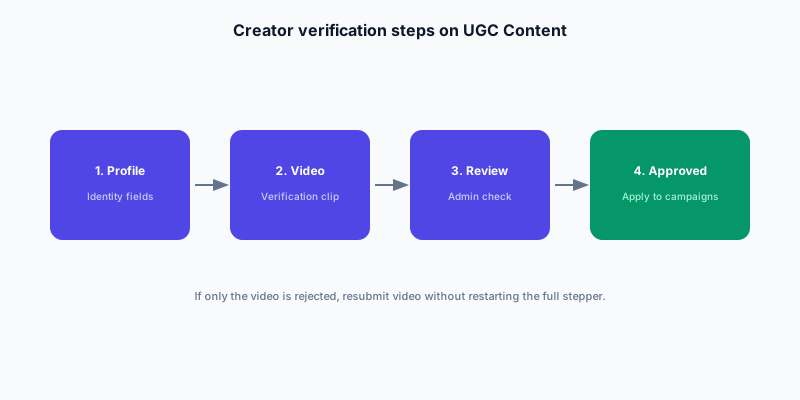
A video rejection does not reset your entire profile. If your identity details have already been accepted, you only need to resubmit the video - not redo the full verification stepper.
Read the admin feedback carefully. Rejections are usually for specific fixable reasons: poor audio, face not visible, instructions not followed, or name mismatch.
- Read the rejection reason in your dashboard notification
- Fix only the specific issue: audio, lighting, face visibility, or instruction compliance
- If your identity is already approved and only the video was rejected, go to Profile Settings > Verification tab to resubmit the video without restarting the full stepper
- If both identity and video are rejected, follow the full stepper again
- After resubmission, allow the same review period - do not resubmit multiple times in quick succession
After verification: what comes next
Verified status alone does not let you apply to campaigns. You also need an eligible creator plan (Creator Pro or Studio) to unlock campaign applications, media kit, and invoicing tools.
Use the time between verification and your first campaign to build your portfolio. Three strong niche clips - even spec samples filmed with products you own - improve your acceptance rate on paid briefs significantly.
- Upgrade to Creator Pro or Studio plan to unlock campaign applications
- Film 3 portfolio clips in one niche and upload them to your public profile
- Browse live campaigns to understand brief formats before applying
- Apply to campaigns where your portfolio matches the product category
- Write application notes with a specific hook idea, not a generic 'I love this product!' message
Verification and your path to earning
Verification is the first step on the path from creator account to first paid brand deal. The full path - from setup through first campaign to scaling income - is covered in the earn hub linked below. Most new creators reach their first approved delivery within 2-4 weeks of completing verification and activating a Pro plan.
FAQ
How does UGC creator verification work on UGC Content?
Complete identity details, connect Instagram when required, and submit a short verification video. Approval typically takes a few business days. After verification, upgrade to Creator Pro or Studio to apply to paid brand campaigns.
Does verification guarantee I will get campaign approvals?
No. Verification plus an eligible creator plan lets you apply to campaigns. Campaign selection depends on portfolio quality, niche fit, and your application note. Verification is required but not sufficient.
Is creator verification free on UGC Content?
Yes. Standard creator identity and video verification is part of the free creator onboarding. Paid plans (Pro, Studio) are required to apply to campaigns, not for verification itself.
How long does the verification review take?
Typically a few business days. Timing varies based on submission volume. Do not resubmit multiple times while waiting - allow the review period to complete.
Can I apply to campaigns without completing verification?
No. Verified status and an eligible creator plan (Pro or Studio) are both required to apply to live brand campaigns on UGC Content.
What if my Instagram account gets disconnected after verification?
Reconnect Instagram via your profile settings. Some campaigns require active Instagram connection at the time of application, not only at initial verification.
Does verification expire?
Verified status does not have an expiry, but UGC Content may request re-verification if profile details change significantly or if suspicious activity is detected. Keep your profile accurate.