
Guide
GST and Invoicing for UGC Creators in India
As your UGC income grows, brands will ask for GST invoices. This guide covers GST thresholds, what to put on an invoice, and when to hire a CA. This is general information only - not tax or legal advice. Verify all thresholds and rules on official government portals.
On this page
Quick answer: do UGC creators need GST?
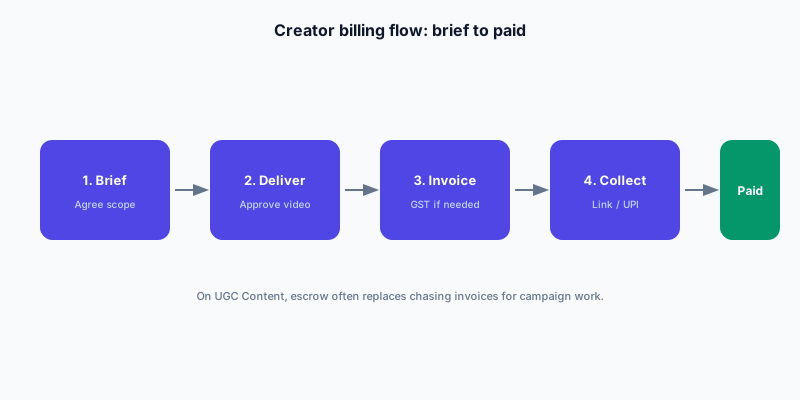
Most new UGC creators in India do not need GST registration immediately. GST registration is required when your annual turnover from services exceeds the threshold set by law - currently ₹20 lakh for most states (₹10 lakh for special category states) for service providers. Some e-commerce and digital service rules vary.
If you are earning ₹5,000-₹30,000 per month from UGC and no other service income, you may be well below the threshold. But as income grows, tracking becomes essential. The threshold can also change, so check the current rules on the GST Council portal or ask a chartered accountant.
GST threshold basics for creators
Note: threshold figures are indicative based on general GST rules as of 2026. Government notifications may update these. Always verify on the official GST portal (gst.gov.in) or with a CA.
| Situation | Threshold (approx. current) | What to do |
|---|---|---|
| Annual service income below ₹20L (most states) | Not required to register | Track income, consult CA as you approach threshold |
| Annual service income above ₹20L | Registration likely required | Register, charge GST, file returns regularly |
| Special category states (NE + Himachal, Uttarakhand) | ₹10L threshold | Lower threshold - check state-specific rules |
| Billing international brands (export of services) | Separate zero-rated export rules | Consult CA - different invoicing requirements apply |
Why brands ask for GST invoices
Indian D2C brands and agencies are registered businesses that need GST-compliant invoices to claim input tax credit (ITC) on service payments. If you are not GST-registered, they cannot claim ITC on your payment. Some brands will still pay you without a GST invoice, but larger companies and agencies often require it.
As your rates rise and you work with bigger brands, GST registration becomes a competitive advantage - it makes you easier to work with from their finance team's perspective.
What to include on a UGC creator invoice
Whether or not you are GST-registered, include these fields on every invoice you send a brand:
- Your legal name and permanent address
- Invoice number and invoice date
- Brand's legal name and address
- Description of deliverable: e.g. '1 x 30-second UGC video for Instagram Reels, organic usage rights, 90 days'
- Payout amount as agreed in the campaign brief
- If GST-registered: your GSTIN, HSN/SAC code (9983 for other professional services is commonly used), and applicable GST (18% for most digital/content services)
- Bank details: account number, IFSC, bank name
- Payment terms: due on delivery / due in X days
Sample invoice structure
Invoice and quotation tools on UGC Content
UGC Content offers invoice and quotation tools on eligible creator plans. These tools help you generate professional invoices without building a template from scratch. You can also track invoice status and keep records for ITR filing.
Even if you use the platform's tools, save a PDF copy of every invoice for your own records. Banks and CAs need a paper trail when you file returns or apply for loans.
TDS: when brands deduct tax at source
Some brands and agencies deduct TDS (Tax Deducted at Source) from your payment. Currently, digital content services may attract TDS under Section 194J or 194C depending on how the engagement is classified. Your net payment will be lower than the invoice amount when TDS applies.
You can claim TDS credit when filing your ITR. Keep all Form 16A certificates that brands provide after deducting TDS. If a brand deducts TDS without issuing Form 16A, follow up - you need it to file correctly.
When to hire a CA
- Your annual UGC income approaches ₹10-15 lakh and you are unsure about registration requirements
- You earn from multiple revenue streams (UGC + freelancing + YouTube ads + affiliate)
- A brand or agency asks about TDS and you do not know how to handle it
- You receive an invoice from a foreign brand and need to understand export of services rules
- You want to set up a business entity (sole proprietorship, LLP) to formalize your UGC work
Tax tracking habits to start now
- Create a simple spreadsheet: campaign name, brand, amount invoiced, date paid, TDS if applicable
- Save every bank transaction notification tied to a UGC payment
- Keep copies of all invoices - sent and received - in one folder
- Note which campaigns had GST invoiced and which did not
- At year end, total your income and take the folder to a CA before filing ITR
FAQ
Do I need GST registration to earn from UGC in India?
Not unless your annual service income exceeds the registration threshold (approximately ₹20 lakh for most states as of 2026). Track your income monthly. Consult a CA when you approach the threshold - it can change by government notification.
What GST rate applies to UGC creator services?
Content creation services typically fall under 18% GST as a professional or digital service. The exact HSN/SAC code and rate can vary; verify with a CA for your specific service type.
Will UGC Content deduct TDS from my payment?
Check the platform's current payment and tax documentation in your account settings. TDS applicability and rates are governed by tax law and may depend on your registration status and payment amount.
Which plan do I need for invoicing?
Invoice and quotation tools are available on eligible creator plans - check the current feature list on the Pricing page. Free includes a monthly invoice limit; Pro unlocks unlimited invoices.
What is an HSN/SAC code and do I need one on my invoice?
SAC (Service Accounting Code) is required on GST invoices for registered taxpayers. For content creation or professional services, SAC 9983 is commonly used, but confirm with your CA for your specific service classification.
How do I handle invoicing for a foreign brand?
Services billed to foreign clients may qualify as zero-rated exports under GST. This has different invoicing, GSTIN, and return-filing requirements. Consult a CA before sending your first foreign invoice.